
Advanced example
Longhorn
Distributed replicated storage for Kind + Cloudburst. CNCF project with HA, snapshots, and GUI.
Longhorn is a CNCF project for distributed block storage. It replicates data across nodes and provides a GUI dashboard. Suitable for workloads that need durability and replication.
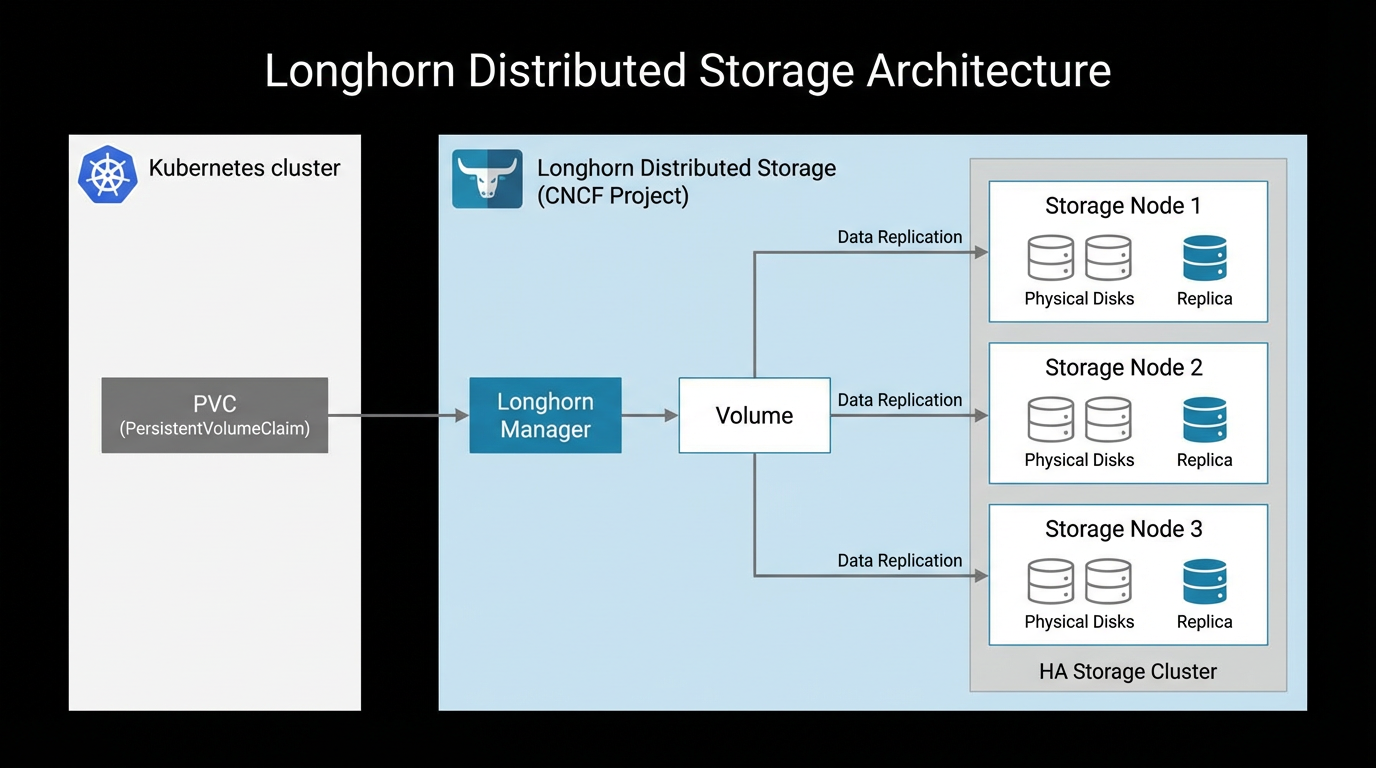
1. Install with kubectl
kubectl apply -f https://raw.githubusercontent.com/longhorn/longhorn/v1.9.1/deploy/longhorn.yaml2. Install with Helm (alternative)
helm repo add longhorn https://charts.longhorn.io
helm repo update
kubectl create namespace longhorn-system
helm install longhorn longhorn/longhorn --namespace longhorn-system
3. Create a PVC and Pod
apiVersion: v1
kind: PersistentVolumeClaim
metadata:
  name: longhorn-pvc
spec:
  accessModes:
    - ReadWriteOnce
  storageClassName: longhorn
  resources:
    requests:
      storage: 2Gi
---
apiVersion: v1
kind: Pod
metadata:
  name: longhorn-test
spec:
  containers:
  - name: workload
    image: busybox:1.36
    command: ["sleep", "infinity"]
    volumeMounts:
    - name: data
      mountPath: /data
  volumes:
  - name: data
    persistentVolumeClaim:
      claimName: longhorn-pvc
4. Verify
kubectl get pods -n longhorn-system -w
kubectl get storageclass
kubectl apply -f longhorn-pvc-pod.yaml
kubectl get pvc
kubectl get pv
5. Longhorn UI
Expose the Longhorn UI via the Tailscale Operator or port-forward:
# Port-forward to access Longhorn UI (no auth by default)
kubectl port-forward -n longhorn-system svc/longhorn-frontend 8080:80
6. Combined example — App with PVC + Tailscale + pod affinity
Deploy an app with Longhorn storage, a worker that co-locates via pod affinity (avoids egress), and expose the app via Tailscale. Install Longhorn and Tailscale operator first, then apply:
# 1. PVC (Longhorn)
apiVersion: v1
kind: PersistentVolumeClaim
metadata:
  name: app-data
spec:
  accessModes: [ReadWriteOnce]
  storageClassName: longhorn
  resources:
    requests:
      storage: 5Gi
---
# 2. App Deployment (uses PVC)
apiVersion: apps/v1
kind: Deployment
metadata:
  name: app
spec:
  replicas: 1
  selector:
    matchLabels:
      app: app
  template:
    metadata:
      labels:
        app: app
    spec:
      containers:
      - name: app
        image: nginx:alpine
        volumeMounts:
        - name: data
          mountPath: /usr/share/nginx/html
      volumes:
      - name: data
        persistentVolumeClaim:
          claimName: app-data
---
# 3. Worker Deployment: pod affinity to run on same node as app (avoids egress)
apiVersion: apps/v1
kind: Deployment
metadata:
  name: worker
spec:
  replicas: 2
  selector:
    matchLabels:
      app: worker
  template:
    metadata:
      labels:
        app: worker
    spec:
      affinity:
        podAffinity:
          preferredDuringSchedulingIgnoredDuringExecution:
          - weight: 100
            podAffinityTerm:
              labelSelector:
                matchLabels:
                  app: app
              topologyKey: kubernetes.io/hostname
      containers:
      - name: worker
        image: busybox:1.36
        command: ["sleep", "infinity"]
        resources:
          requests:
            cpu: "200m"
            memory: "256Mi"
---
# 4. Service exposed via Tailscale (no public IP)
apiVersion: v1
kind: Service
metadata:
  name: app
  annotations:
    tailscale.com/hostname: app
spec:
  ports:
  - name: http
    port: 80
    targetPort: 80
  type: LoadBalancer
  loadBalancerClass: tailscale
Apply and verify
kubectl apply -f combined-app.yaml
kubectl get pvc
kubectl get pods -o wide
kubectl get svc app
# Access via MagicDNS: http://app.tailxyz.ts.net
For pod affinity patterns (co-locate to avoid egress, spread for HA), see Pod affinity and Pod anti-affinity.