Advanced example
CloudNativePG
Distributed PostgreSQL with primary/standby replication. Restore replicas on newly provisioned burst nodes.
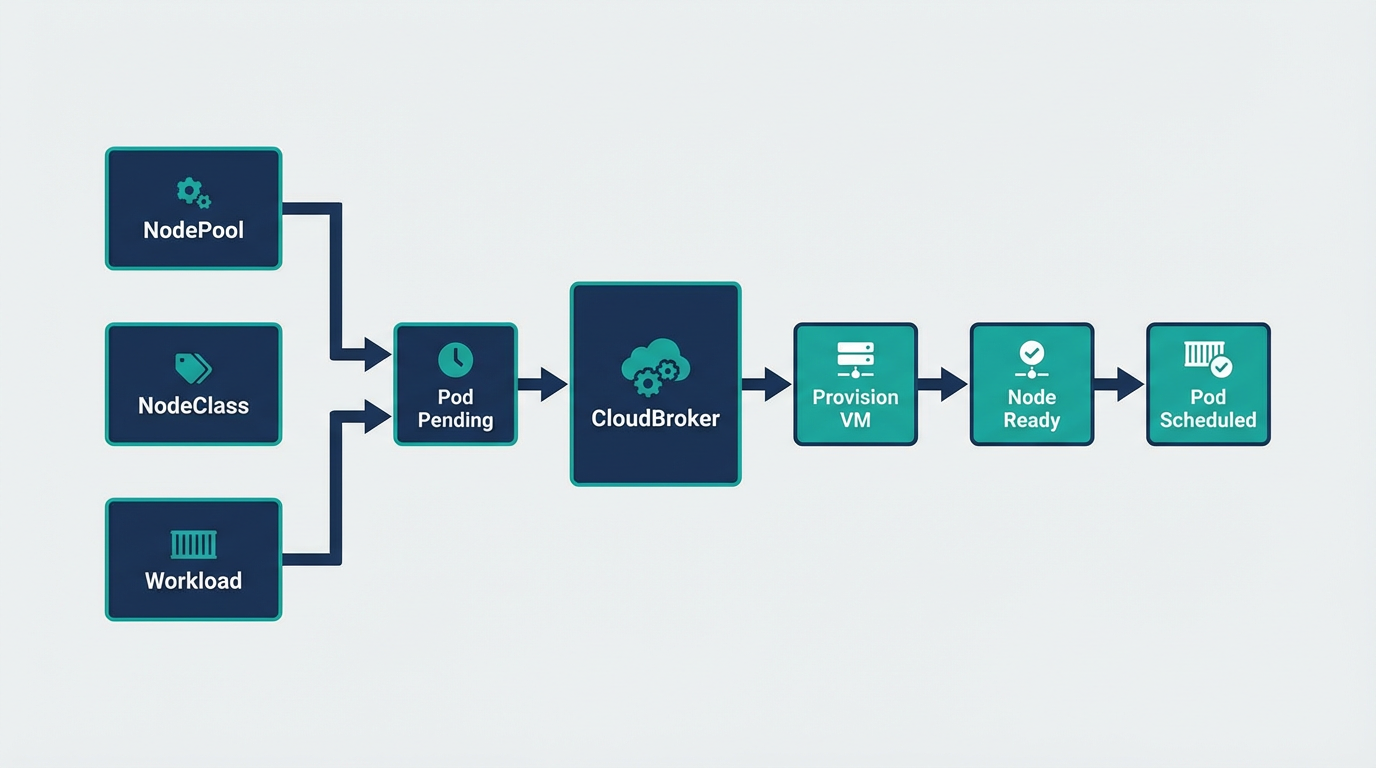
CloudNativePG is the Kubernetes operator for PostgreSQL. It manages the full lifecycle of a highly available cluster with primary/standby architecture using streaming replication. When you scale replicas, new pods target burst nodes via nodeSelector. Cloudburst provisions a node, the pod schedules, and CloudNativePG restores the replica from the primary via streaming replication.
- CloudBroker running
- Tailscale installed
- Provider credentials in Kubernetes secrets
- Storage class: Longhorn or Local Path Provisioner
- NodePool + NodeClass: GCP or Hetzner
1. Install CloudNativePG operator
kubectl apply --server-side -f \
  https://raw.githubusercontent.com/cloudnative-pg/cloudnative-pg/release-1.28/releases/cnpg-1.28.1.yaml
Verify the operator is running:
kubectl rollout status deployment -n cnpg-system cnpg-controller-manager2. NodePool and NodeClass for burst nodes
Create a NodePool and NodeClass so Cloudburst can provision nodes for PostgreSQL replicas. Use the same pattern as GCP or Hetzner. The NodePool template must include cloudburst.io/nodepool: cnpg-nodepool so the Cluster's nodeSelector matches.
apiVersion: cloudburst.io/v1alpha1
kind: NodePool
metadata:
  name: cnpg-nodepool
  namespace: default
spec:
  requirements:
    regionConstraint: "ANY"
    arch: ["x86_64"]
    maxPriceEurPerHour: 0.15
    allowedProviders: ["gcp"]  # or hetzner, aws, etc.
  limits:
    maxNodes: 3
    minNodes: 0
  template:
    labels:
      cloudburst.io/nodepool: "cnpg-nodepool"
      cloudburst.io/provider: "gcp"
  disruption:
    ttlSecondsAfterEmpty: 120
    ttlSecondsUntilExpired: 3600
  weight: 1
Add the corresponding NodeClass for your provider (see provider examples).
3. CloudNativePG Cluster with nodeSelector
Create a Cluster that schedules all instances on burst nodes. With instances: 2, the primary starts first. The replica pod is Pending until a burst node exists. Cloudburst provisions a node, the pod schedules, and CloudNativePG restores the replica from the primary via streaming replication.
apiVersion: postgresql.cnpg.io/v1
kind: Cluster
metadata:
  name: cnpg-cluster
  namespace: default
spec:
  instances: 2
  imageName: ghcr.io/cloudnative-pg/postgresql:16
  storage:
    size: 5Gi
    storageClass: longhorn  # or standard, local-path, etc.
  affinity:
    nodeSelector:
      cloudburst.io/nodepool: "cnpg-nodepool"
    enablePodAntiAffinity: true
    topologyKey: kubernetes.io/hostname
4. Apply and verify
kubectl apply -f cnpg-cluster.yaml
kubectl get cluster -n default
kubectl get pods -l cnpg.io/cluster=cnpg-cluster -w
kubectl get nodeclaims -w
Watch the flow: the primary pod schedules first (if a burst node exists or the primary can land on a stable node—otherwise both are Pending). When you have instances: 2 and only one node, the replica stays Pending. Cloudburst provisions a second node, the replica schedules, and CloudNativePG restores it from the primary via streaming replication.
5. Scale replicas
Increase instances to add more read replicas. Each new replica pod targets burst nodes via nodeSelector. Pending pods trigger Cloudburst to provision additional nodes.
kubectl patch cluster cnpg-cluster -n default --type merge -p '{"spec":{"instances":3}}'For more on CloudNativePG (backups, PITR, PgBouncer), see the CloudNativePG documentation.