
Advanced example
Workload without nodeAffinity
Pods without nodeSelector or nodeAffinity can land on any burst node with capacity.
When multiple NodePools exist, the scheduler may place the pod on any provider. Use this when you don't care which cloud hosts the workload. CloudBroker ranks providers by cost; the controller provisions the cheapest option.
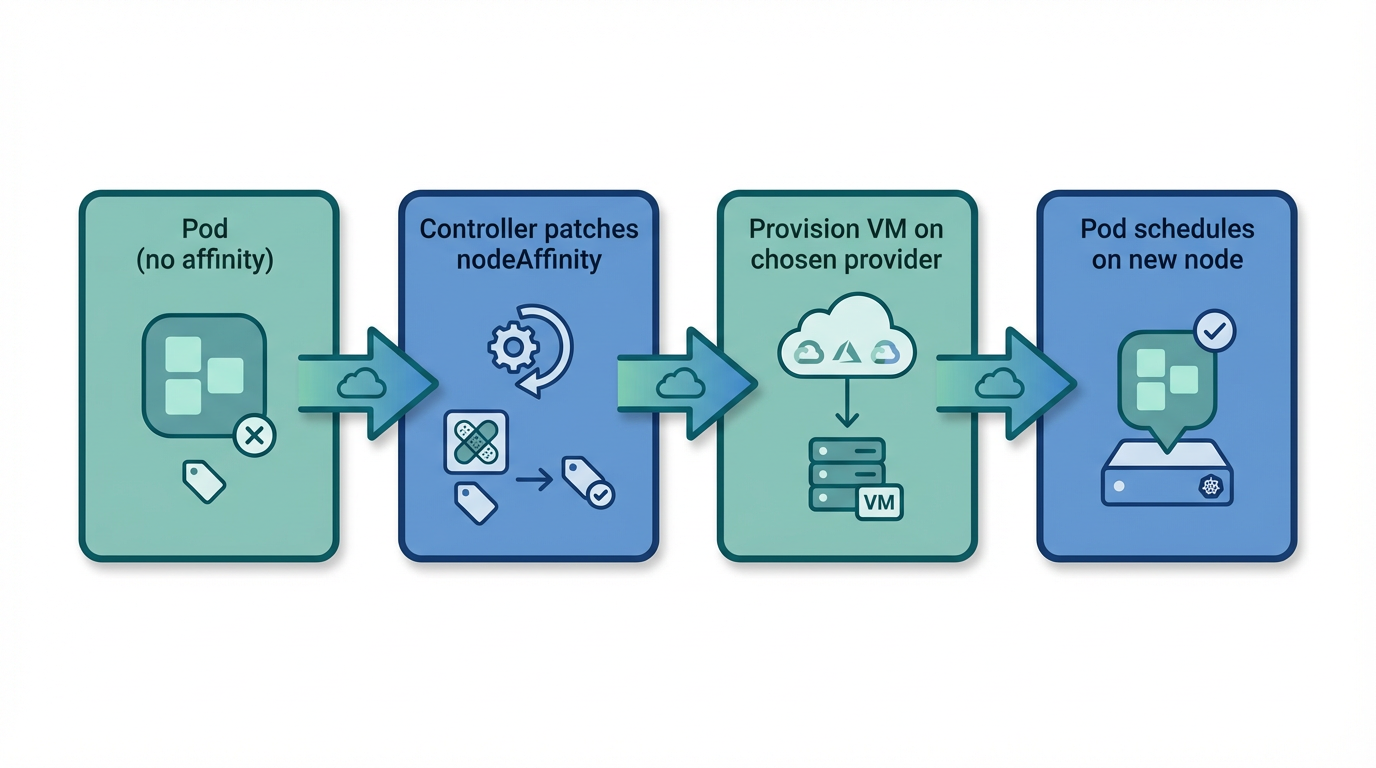
When existing nodes have no capacity
If no existing node (static or burst) has enough CPU/memory for the pod, the scheduler leaves it Pending with reason Unschedulable. Cloudburst detects that unschedulable pod, aggregates its resource requests, and asks CloudBroker for the cheapest instance that fits. The controller provisions a new VM on the chosen provider, bootstraps it (Tailscale, kubelet, kubeadm join), and the node joins the cluster. Before creating the NodeClaim, the controller patches the pod with nodeAffinity for cloudburst.io/provider equal to the chosen provider. That ensures the pod lands on the node that was provisioned for it, not on some other burst node. Once the node is Ready, the scheduler places the pod on it. Pods that already have nodeSelector or nodeAffinity for cloudburst.io/provider or cloudburst.io/nodepool are not patched.
Full manifest (NodePool + NodeClass + Workload)
# NodePool (allows any provider; Scaleway used here for simplicity)
apiVersion: cloudburst.io/v1alpha1
kind: NodePool
metadata:
  name: any-provider-nodepool
  namespace: default
spec:
  requirements:
    regionConstraint: "ANY"
    arch: ["x86_64"]
    maxPriceEurPerHour: 0.15
    allowedProviders: ["scaleway"]
  limits:
    maxNodes: 3
    minNodes: 0
  template:
    labels:
      cloudburst.io/nodepool: "any-provider-nodepool"
      cloudburst.io/provider: "scaleway"
  disruption:
    ttlSecondsAfterEmpty: 60
    ttlSecondsUntilExpired: 3600
  weight: 1
---
# NodeClass
apiVersion: cloudburst.io/v1alpha1
kind: NodeClass
metadata:
  name: any-provider-nodeclass
  namespace: default
spec:
  scaleway:
    zone: "fr-par-1"
    projectID: "your-scaleway-project-id"
    image: "ubuntu_jammy"
    apiKeySecretRef:
      name: scaleway-credentials
      key: SCW_SECRET_KEY
  join:
    hostApiServer: "https://<HOST_TAILSCALE_IP>:6443"
    kindClusterName: "cloudburst"
    tokenTtlMinutes: 60
  tailscale:
    authKeySecretRef:
      name: tailscale-auth
      key: authkey
  bootstrap:
    kubernetesVersion: "1.34.3"
---
# Workload (no nodeSelector/nodeAffinity — can land on any burst node)
apiVersion: v1
kind: Pod
metadata:
  name: any-provider-workload
  namespace: default
spec:
  containers:
  - name: workload
    image: busybox:1.36
    command: ["sleep", "infinity"]
    resources:
      requests:
        cpu: "1500m"
        memory: "2Gi"
Apply and verify
# Ensure secrets exist: tailscale-auth, scaleway-credentials
kubectl create secret generic tailscale-auth --from-literal=authkey="<YOUR_TAILSCALE_AUTHKEY>" -n default
kubectl create secret generic scaleway-credentials --from-literal=SCW_SECRET_KEY="<YOUR_SCW_SECRET_KEY>" -n default

# Apply and watch
kubectl apply -f any-provider-example.yaml
kubectl get nodeclaims -w
kubectl get pods -o wide
kubectl get nodes -l cloudburst.io/nodepool=any-provider-nodepool