
Self-hosted · Open source
Burst incredible.
No hassle.
When a pod can’t be scheduled, Cloudburst adds the cheapest node across multiple clouds. One brain (CloudBroker), one set of hands (the Autoscaler). No manual resizing. No lock-in.
Quick flow:
kubectl get pods→ Pendingkubectl get nodeclaims→ Provisioning- Node Ready → Pod scheduled
# pod is Pending — no capacity
$ kubectl get pods
NAME          STATUS    REASON
my-job-xk9p   Pending   Unschedulable

# cloudburst detects demand, asks CloudBroker
$ kubectl get nodeclaims
NAME                     PHASE         PROVIDER   INSTANCE   AGE
cloudburst-pool-x7kq2    Provisioning  hetzner    cx31       8s

# node joins, pod schedules
$ kubectl get nodes -l cloudburst.io/provider
NAME                     STATUS   VERSION
cloudburst-pool-x7kq2    Ready    v1.34.3

✓ Pod scheduled · €0.009/hr · scale-down in 60s idle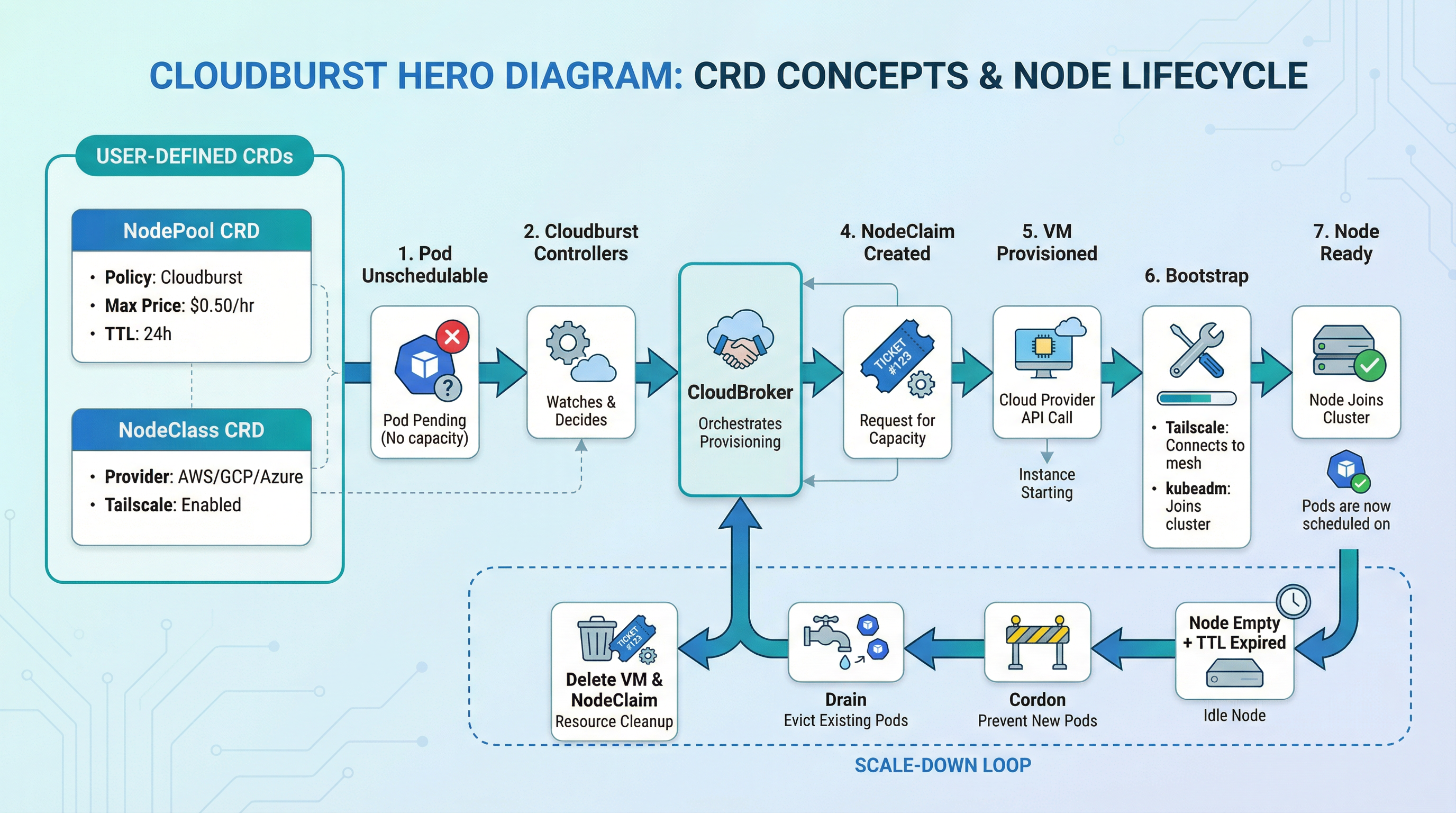
Simple. Fast. Cost-aware.
NodePool, NodeClass, NodeClaim — define policy once, let the controller act.
Unschedulable pod detected → cheapest VM chosen → node Ready. Fully automated.
CloudBroker picks the cheapest fit across 8 clouds. No manual picking, no lock-in.
AWS, GCP, Azure, Hetzner, Scaleway, DigitalOcean, OVH, Aruba — burst wherever it's cheapest.
Your cluster, your data, your costs. MIT licensed. No vendor dependency.
Why Cloudburst
Simple configuration. Automatic operation. Yours to own.
One NodePool and NodeClass per provider. Apply manifests, let the controller act. No scripts, no custom tooling.
Unschedulable pod triggers a burst node. No manual work. Node joins via Tailscale, pod schedules, scales down when idle.
Self-hosted controller, MIT licensed. No vendor lock-in. Runs in your cluster, uses your credentials.
Use cases
When Cloudburst fits best.
Cost-optimised batch & CI
Cheapest burst node for batch jobs, CI, or ML training.
Cross-cloud hybrid
EKS control plane, burst workers to Hetzner/Scaleway via Tailscale.
EU compliance
Restrict bursts to EU regions via CloudBroker's region constraint.
Dev/staging scale-to-zero
Base cluster at zero; burst only when devs run integration tests.
Event-driven spikes
Handle launches or campaigns without year-round over-provisioning.
Disaster recovery & failover
Automatic failover to alternative providers when primary cloud fails.
Supported providers
Burst to the cheapest node across multiple clouds. More providers are added over time.
 GCP
GCP Hetzner
 Scaleway
 DigitalOcean
 OVH
OVH Aruba
ArubaBurst nodes via CloudBroker · Cheapest instance selected automatically
Cloudburst vs alternatives
Same problem (unschedulable pods → provision nodes → deprovision when idle). Different focus.
| Cloudburst | Karpenter | Cluster Autoscaler | |
|---|---|---|---|
| Provider scope | Multi-cloud (GCP, AWS, Azure, Hetzner, Scaleway, DigitalOcean, OVH, Aruba) | Primarily AWS (EKS) | Per-provider (node groups) |
| Cost selection | Cheapest instance across providers (via CloudBroker) | Spot/preemptible within same cloud | Resize existing node groups |
| Cross-cloud burst | ✅ Yes — e.g. EKS control plane, Hetzner burst nodes (Tailscale) | ❌ No — nodes in same cloud as cluster | ❌ No — scales node groups in-place |
The only self-hosted multi-cloud autoscaler with 8 providers and automatic failover.
Articles
Four-part intro: problem and product, how it works, the interface (NodePool, NodeClass, NodeClaim), scope and run.
Architecture
DemandDetector, NodePool and NodeClaim controllers, bootstrap and scale-down flow.
Examples
With CloudBroker and Tailscale running, apply the CRDs and sample manifests. Each example includes NodePool, NodeClass, workload YAML, and exact kubectl commands.
Frequently asked questions
Cloudburst is a Kubernetes controller that adds burst nodes when pods can’t be scheduled. It asks CloudBroker for the cheapest VM that fits, provisions it on the right cloud (e.g. GCP, AWS, Hetzner, Scaleway — more coming), and bootstraps it with Tailscale + kubeadm join. When the node is empty long enough, it cordons, drains, and deletes the VM.
CloudBroker (for recommendations), Tailscale (for networking), and provider API credentials. You define NodePool and NodeClass; the system creates NodeClaims and VMs. See the repo for config/samples/ and make kind-setup-and-deploy.
It’s open source. You run it. You pay for the VMs you burst to — and the controller picks the cheapest one that fits. No monthly fee to us.
Yes. When the node has been empty for ttlSecondsAfterEmpty (set in NodePool), the controller cordons, drains, and deletes the VM. Billing stops.
Burst nodes talk to the control plane over Tailscale. To measure latency:
- Burst node → control plane:
kubectl execinto a pod on a burst node andpingthe control plane Tailscale IP (from your NodeClasshostApiServer). For API round-trip:curl -o /dev/null -w "%{time_total}s" -k https://<TAILSCALE_IP>:6443/healthz. - Worker ↔ worker: Run debug pods on different nodes and ping each other’s node IP (Tailscale IP for burst nodes). Use
kubectl get nodes -o wideto see IPs.
Tailscale may use DERP relays when direct connectivity fails, which can add latency. For low-latency workloads, prefer burst nodes in regions close to your control plane.
The Tailscale Kubernetes Operator lets you expose cluster workloads to your tailnet via LoadBalancer Services or Ingress. No public IPs, no cloud load balancers, no extra cost. Create a Service with loadBalancerClass: tailscale or an Ingress with ingressClassName: tailscale — the operator provisions a Tailscale node and gives you a MagicDNS name. Access from any device on your tailnet. See the Tailscale Operator example for full manifests.
Two options work well with Cloudburst clusters:
- Local Path Provisioner: Simple local storage on each node. Uses
/opt/local-path-provisionerby default. Suitable for dev/test and single-node workloads. Install withkubectl apply -f https://raw.githubusercontent.com/rancher/local-path-provisioner/v0.0.34/deploy/local-path-storage.yaml. UsestorageClassName: local-pathin your PVCs. - Longhorn: CNCF distributed block storage. Replicates data across nodes, supports snapshots and backups. Suitable for workloads that need durability and HA. Install with
kubectl apply -f https://raw.githubusercontent.com/longhorn/longhorn/v1.9.1/deploy/longhorn.yamlor via Helm. UsestorageClassName: longhornin your PVCs.
See Local Path Provisioner and Longhorn for full PVC and Pod manifests.
Traffic between pods on different burst nodes can incur cloud egress charges. Use Kubernetes pod affinity to co-locate related pods on the same node so they communicate over the node network instead of crossing nodes.
Hard affinity (required): the pod must run on a node that already has a matching pod. Use when co-location is critical (e.g. app + cache sidecar):
affinity:
  podAffinity:
    requiredDuringSchedulingIgnoredDuringExecution:
    - labelSelector:
        matchLabels:
          app: my-app
      topologyKey: kubernetes.io/hostname
Soft affinity (preferred): the scheduler tries to co-locate but will place elsewhere if needed. Use when you want to reduce egress without blocking scheduling:
affinity:
  podAffinity:
    preferredDuringSchedulingIgnoredDuringExecution:
    - weight: 100
      podAffinityTerm:
        labelSelector:
          matchLabels:
            app: my-app
        topologyKey: kubernetes.io/hostname
When to spread instead: For HA, use podAntiAffinity with topologyKey: kubernetes.io/hostname to spread replicas across nodes — but expect cross-node traffic and egress. Balance co-location (fewer nodes, less egress) vs. spreading (more resilience). See Pod affinity and Pod anti-affinity for more patterns.
How they work together
Powered by CloudBroker: the recommendation API that knows prices across multiple clouds. Cloudburst asks; CloudBroker answers.
Get your first burst node in minutes.
8 cloud providers. Self-hosted. Cost-aware. No vendor lock-in.